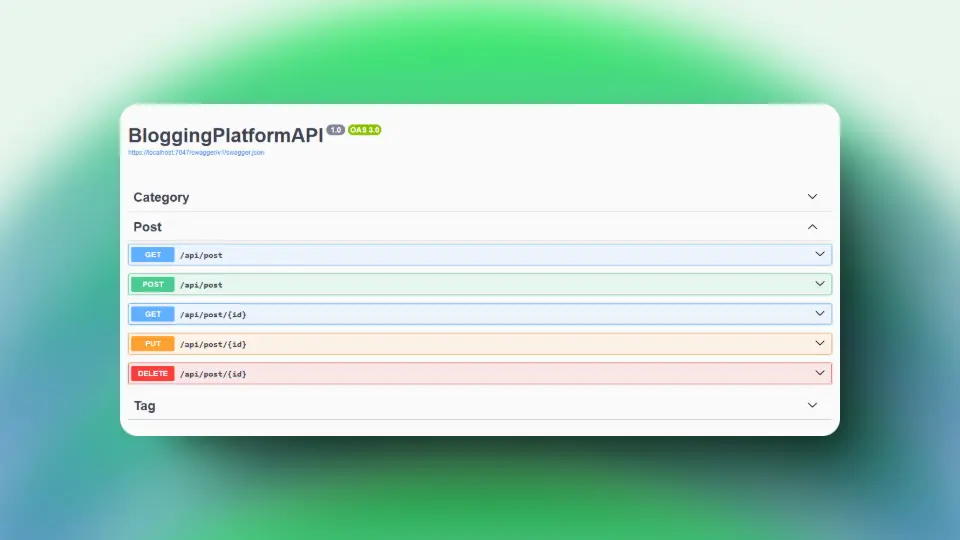
Descripción
Este proyecto es una API RESTful básica para una plataforma de blogs personales. La API permite realizar operaciones CRUD (Crear, Leer, Actualizar y Eliminar) en publicaciones de blog. Además, las publicaciones del blog se pueden filtrar por un término de búsqueda.
Uso
Crear publicación de blog
Crea una nueva publicación de blog usando el método POST
POST /posts
{
  "title": "My First Blog Post",
  "content": "This is the content of my first blog post.",
  "category": "Technology",
  "tags": ["Tech", "Programming"]
}
Response:
{
  "id": "00000000-0000-0000-0000-000000000000",
  "title": "My First Blog Post",
  "content": "This is the content of my first blog post.",
  "category": "Technology",
  "tags": ["Tech", "Programming"],
  "createdAt": "2023-03-01T00:00:00.0000000",
  "updatedAt": "2023-03-01T00:00:00.0000000"
}
Actualizar publicación de blog
Actualizar una publicación de blog existente usando el método PUT
PUT /posts/00000000-0000-0000-0000-000000000000
{
  "title": "My Updated Blog Post",
  "content": "This is the updated content of my first blog post.",
  "category": "Technology",
  "tags": ["Tech", "Programming"]
}
Response:
{
  "id": "00000000-0000-0000-0000-000000000000",
  "title": "My Updated Blog Post",
  "content": "This is the updated content of my first blog post.",
  "category": "Technology",
  "tags": ["Tech", "Programming"],
  "createdAt": "2021-09-01T12:00:00Z",
  "updatedAt": "2021-09-01T12:30:00Z"
}
Eliminar publicación de blog
Eliminar una publicación de blog existente usando el método DELETE
DELETE /posts/00000000-0000-0000-0000-000000000000
Response:

{
  "00000000-0000-0000-0000-000000000000"
}
Obtener publicación de blog
Obtenga una sola publicación de blog usando el método GET
GET /posts/00000000-0000-0000-0000-000000000000Response:
{
  "id": "00000000-0000-0000-0000-000000000000",
  "title": "My Updated Blog Post",
  "content": "This is the updated content of my first blog post.",
  "category": "Technology",
  "tags": ["Tech", "Programming"],
  "createdAt": "2021-09-01T12:00:00Z",
  "updatedAt": "2021-09-01T12:30:00Z"
}
Obtener todas las publicaciones del blog
Obtenga todas las publicaciones del blog utilizando el método GET
GET /postsResponse:
[
  {
    "id": "00000000-0000-0000-0000-000000000000",
    "title": "My Updated Blog Post",
    "content": "This is the updated content of my first blog post.",
    "category": "Technology",
    "tags": ["Tech", "Programming"],
    "createdAt": "2021-09-01T12:00:00Z",
    "updatedAt": "2021-09-01T12:30:00Z"
  },
  {
    "id": "00000000-0000-0000-0000-000000000001",
    "title": "My Second Blog Post",
    "content": "This is the content of my second blog post.",
    "category": "Technology",
    "tags": ["Tech", "Programming"],
    "createdAt": "2021-09-01T12:00:00Z",
    "updatedAt": "2021-09-01T12:30:00Z"
  }
]